Document
A document resource is a singular concept that is referring to a business entity or object instance. A document’s state representation typically includes both fields with values and links to other related resources.
Documents in a collection
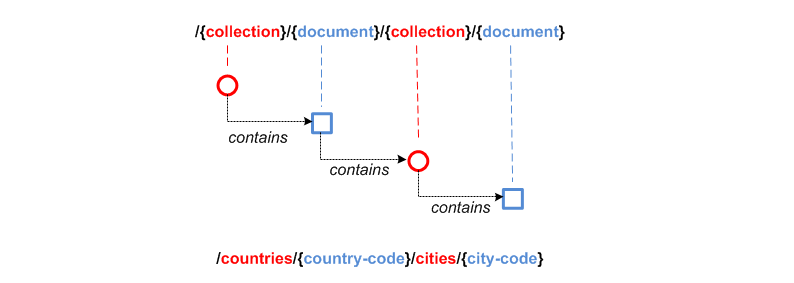
Most document resources are contained in a parent collection resource to which a variable path segment with identity key is added.
| Location | Document URI | Resource representation | Path template |
|---|---|---|---|
part of collection |
|
|
|
Singleton documents
Documents may also be singletons, of which only a single instance exists within the context of its parent, if any. A singleton document’s URI ends with a fixed path segment that is a singular noun.
| Location | Document URI | Resource representation | Path template |
|---|---|---|---|
singleton with document as parent |
|
image file (binary) |
|
singleton without a parent |
|
|
|
Child resources
A document may have child resources of any type (singleton document, collection or controller) that represent its specific subordinate concepts. When defining child resources, stick to concepts within the same API.
In domain modeling, an entity can be modeled as a child of another entity (the aggregate root), when its lifecycle depends on the parent, i.e.:
-
a child resource cannot be created without a parent
-
if the parent is deleted, the child is deleted as well
-
it is not possible to change the parent of a child
Occasionally complex documents have so many related resources that putting all these different concepts in a single API becomes unmanageable. For example, an employer document could link to related resources describing employees, debts, taxes, mandates, declarations, risks, etc. In that case, model the related resources in a separate API and link to the principal resource not by including a link (URL) across APIs (see [hyp-links]) but just by adding the identifier of the principal resource in the representation.
Rule: Child entities [child-ent]
Interactions with entities that are, in a conceptual data model, children of aggregate entities, can be represented in multiple ways in a REST API.
The identity of a child entity can be represented by:
-
its own globally unique identifier
-
or a composite key (parent id + child id) with the child id only unique within the scope of its parent
If there’s a natural business key, whether composite or not, it SHOULD be used instead of introducing a new identifier (also see [id-choice]).
Regardless of choice, the identifier of the parent SHOULD be included in the full representation of a child and be immutable.
The path of a child entity can be designed either as a top-level or child resource path:
| option | preferred when |
|---|---|
top-level resource path |
|
child resource path under the parent entity |
|
Consider following example:
-
a meeting is a top level resource:
/meetings/{meetingId} -
a meeting has invitation child entities
-
an invitation could uniquely be identified by
meetingIdandpersonId, as a person can only be invited to a meeting once. Alternatively, a new globally uniqueinvitationIdcould be introduced.
Following choices are possible to represent invitation entities:
| identity of child entity | child resource path | top-level resource path |
|---|---|---|
composite key |
|
|
globally unique id |
|
|
(1) this operation only needs to be defined if it should be possible to query invitations across all meetings, e.g. GET /invitations?personId={personId}
(2) to avoid URL parsing errors, the character used as key separator (: in this example) should be chosen so that it isn’t allowed as part of meetingId or personId
Identifier
Rule: Choice of identifier [id-choice]
The identity key of a document resource is preferably a natural business identifier uniquely identifying the business resource like an ISBN or SSIN. If such key does not exist, a surrogate or technical key can be created.
New types of identifiers should be designed carefully. Once an identifier has been introduced, it may get widespread usage in various systems even beyond the scope for which it was initially designed, making it very hard to change its structure later on.
Designing identifiers in a URI structure, as specified in the ICEG URI standard, is useful as it makes the identifier context-independent and more self-descriptive. A REST API may choose to use a shorter API-local form of a URI identifier because of practical considerations.
When designing an identifier, various requirements may be of importance specific to the use case:
-
the governance and lifecycle of identifiers and the entities they represent
-
easy to memorize (e.g. textual identifier like problem types)
-
input by user (e.g. web form, over phone/mail)
-
easy to type (ignore special separator chars, difference between lower/capital case), limited length
-
validation of typing errors, e.g. by checksum, fixed length, …
-
hint on format to recognize purpose of identifier based on its value
-
-
printable (restricted length)
-
open to evolve structure for new use cases
-
ability to generate identifiers collision-free at multiple independent sources, e.g. by adding a source-specific prefix, using UUIDs, …
-
stable across different deployment environments (e.g. problem type codes)
-
hide any business information (e.g. no sequential number that indicates number of resources created)
-
not easy to guess a valid identifier, especially for unsecured resources (e.g. no sequentially generated identifier)
-
easy to represent in URL parameter without escaping
-
default configurations of Apache HTTPD, Apache Tomcat (used by Spring Boot) and Spring Security are known to block requests with an escaped slash in a path parameter value
-
-
sortable (for technical reasons e.g. pagination)
Rule: Designing new identifiers [id-design]
For new identifiers, a string based format SHOULD be used: textual lowerCamelCase string codes, UUID, URI or other custom formats. Take into account the requirements that follow from the ways the identifier will be used.
Each identifier MUST be represented by only one single string value, so that a string equality check can be used to test if two identifiers are identical. This means that capitalization, whitespace or leading zeroes are significant.
In the OpenAPI schema for the identifier, a regular expression may be specified if helpful for input validation or as hint of the structure (e.g. to avoid whitespace or wrong capitalization), but shouldn’t be too restrictive in order to be able to evolve the format.
No business meaning SHOULD be attributed to parts of the identifier. This should be captured in separate data fields. Parts with technical meaning like a checksum are allowed.
| Parts of an identifier may carry some business meaning for easier readability, like the problem type identifiers in this guide, but no application logic should parse and interpret these parts. |
| Don’t use database-generated keys as identity keys in your public API to avoid tight coupling between the database schema and API. Having the key independent of all other columns insulates the database relationships from changes in data values or database design (agility) and guarantees uniqueness. |
The table below lists some examples of identifiers, though it does not list all possibilities or considerations when designing a new identifier.
| identifier structure | example | OpenAPI schema | considerations |
|---|---|---|---|
UUID |
"d9e35127-e9b1-4201-a211-2b52e52508df" |
Type defined in common-v1.yaml |
long identifier, not easy to memorize or input by user, easy to generate, resistant to brute-force guessing |
URI (URN) |
"urn:problem-type:belgif:resourceNotFound" |
|
can be human-readable, long, not easy to input by user |
URI (http) |
"https://www.waterwegen.be/id/rivier/schelde" |
|
can be human-readable, long, not easy to input by user, requires support for escaping of slash character when used as URL parameter, can be generated collision-free by multiple sources (different domain name) |
custom format |
"ab12347895" |
|
short, easy to encode |
A code is a special type of identifier:
-
it has an exhaustive list of possible values that doesn’t change frequently over time
-
each value identifies a concept (examples: a country, a gender, …).
Rule: Designing new codes [cod-design]
New code types SHOULD be represented as string values in lowerCamelCase.
Depending on context, the OpenAPI schema enumerate the list of allowed values (see Enum values rule).
GET /refData/paymentMethods/{paymentMethodCode} with paymentMethodCode of type PaymentMethodCode
As string with enumeration:
PaymentMethodCode:
  type: string
  enum:
  - cash
  - wireTransfer
  - creditCard
  - debitCard
As string with regular expression:
PaymentMethodCode:
  type: string
  pattern: "^[A-Za-z0-9]+$"
  example: "debitCard"
Rule: Representing existing numerical identifiers [id-numer]
When defining the type for a property representing an existing numerical code or identifier:
-
Identifiers that are commonly represented (e.g. when displayed or inputted by a user) with leading zeros present SHOULD be represented using a string type. A regular expression SHOULD be specified in the OpenAPI schema to avoid erroneous values (i.e. without leading zeros).
-
Otherwise, use an integer based type. It is RECOMMENDED to further restrict the format of the type (e.g.
format: int32and usingminimum/maximum).
For new identifiers, it is not recommended to use a number type however as stated in [new-identifiers]
An employer ID may be of variable length. Leading zeroes are ignored and most of the time not displayed.
EmployerId:
  description: Definitive or provisional NSSO number, assigned to each registered employer or local or provincial administration.
  type: integer
  format: int64
  minimum: 0
  maximum: 5999999999
  example: 21197
If SSIN has a zero as first digit, it is always displayed.
Ssin:
  description: Social Security Identification Number issued by the National Register or CBSS
  type: string
  pattern: '^\d{11}$'
Country NIS code is a three-digit code, the first digit cannot be a zero.
CountryNisCode:
  description: NIS code representing a country as defined by statbel.fgov.be
  type: integer
  minimum: 100
  maximum: 999
  example: 150 # represents Belgium
Rule: Identifier name [id-name]
Following naming guidelines should be applied when using an identifier or code in a REST API:
-
JSON property:
-
within an object that represents the entire or part of a resource: use
idorcode -
to reference a resource within another one’s representation: property name should designate the relation between the resources (see [jsn-naming]); no need to suffix with
idorcode
-
-
path parameter: use
idorcode, prefixed with the resource type. This allows to disambiguate when there are multiple identifiers in a single path -
query search parameter: use same name as the property in the JSON resource representation of the response (see Filtering)
-
OpenAPI schema: add suffix
IdorCodeto distinguish it from the type of the full resource representation
As an exception, use the standardized name for the business identifier if one exists, rather than id or code.
If multiple identifiers or coding schemes may be used within the same context, a suffix can be added to the name to disambiguate.
Request:
GET /stores/{storeId}/orders/{orderId} (1)Response:
{
  "id": 123,  (2)
  "customer": 456, (3)
  "store": {
     "id": 789, (4)
     "href": "https://api.example.org/demo/v1/stores/789"
  },
  "paymentMethod": "creditCard",
  "deliveryMethod": {
     "code": "deliveredAtHome", (5)
     "href": "https://api.example.org/demo/v1/refData/deliveryMethods/deliveredAtHome"
  }
}
OpenAPI schemas (not all are listed for brevity):
Order: (6)
  type: object
  properties:
    id:
      $ref: "#/components/schemas/OrderId" (7)
    customer:
      $ref: "#/components/schemas/CustomerId" (7)
    store:
      $ref: "#/components/schemas/StoreReference" (8)
    paymentMethod:
      $ref: "#/components/schemas/PaymentMethodCode" (7)
    deliveryMethod:
      $ref: "#/components/schemas/DeliveryMethodReference" (8)

OrderId: (7)
  type: integer
  format: int32
  minimum: 1

StoreReference: (8)
  allOf:
  - $ref: "./common/v1/common-v1.yaml#/components/schemas/HttpLink"
  type: object
  properties:
    id:
      $ref: "#/components/schemas/StoreId" (7)

StoreId: (7)
  type: integer
  format: int32
minimum: 1| 1 | id as path parameter always prefixed with resource type to be able to distinguish multiple path parameters |
| 2 | id as property of the consulted resource |
| 3 | identifier used to reference another resource. JSON property name designates relation to the other resource. |
| 4 | id as property in a partial representation of a store resource |
| 5 | code as property in a partial representation of a deliveryMethod resource |
| 6 | The type of the full resource representation doesn’t have a suffix |
| 7 | Types of the identifiers have the suffix Id or Code |
| 8 | Partial resource representations, which may link to the full resource |
GET /refData/deliveryMethods/{deliveryMethodCode} (1){
"code": "deliveredAtHome",
"description": {
"nl": "Geleverd aan huis",
"en": "Delivered at home",
"fr": "Livré à domicile"
}
}| 1 | code as path parameter always prefixed by resource type |
GET /organizations/{enterpriseNumber} (1){
"enterpriseNumber": "0123456789", (1)
"absorbedOrganizations": ["0234567891", "0345678912"], (2)
"succeededBy": "0456789123", (2)
"status": "active"
}| 1 | Standardized business identifier name enterpriseNumber is preferred over id. |
| 2 | JSON property name designates relation to the other resource. The OpenAPI description declares the expected value to be of schema EnterpriseNumber. |
GET /addresses/{addressId}{
"municipality": {
"code": 10000,
"name": "Brussels"
},
"country": {
"nisCode": 150, (1)
"isoCode": "BE", (1)
"name": {
"nl": "België",
"fr": "Belgique"
}
}
}| 1 | Prefixes nis and iso disambiguate between two types of country identifiers used in a single context |
Consult
GET https://api.example.org/demo/v1/employers/93017373 HTTP/1.1
|
Consult a single employer |
|
Parameters |
||
|
path-param |
NSSO number uniquely identifying the employer. |
Response |
||
body |
The representation of the entity, including links to other resources. |
|
Most used response codes |
||
OK |
Default success code if the document exists. |
|
Bad request |
The dynamic path segment containing the identity key has a wrong data format: |
|
Not Found |
The document resource does not exist. |
|
| 204 No content should not be used when consulting a document. |
Rule: Retrieve partial resource representation [res-repres]
The select query parameter is reserved to return a resource representation with only the specified properties.
The value of this parameter SHOULD follow this BNF grammar:
<selects>            ::= [ <negation> ] <selects_struct>
<selects_struct>     ::= "(" <select_items> ")"
<select_items>       ::= <select> [ "," <select_items> ]
<select>             ::= <select_name> | <selects_substruct>
<selects_substruct>  ::= <select_name> <selects_struct>
<select_name>        ::= <dash_letter_digit> [ <select_name> ]
<dash_letter_digit> ::= <dash> | <letter> | <digit>
<dash>              ::= "-" | "_"
<letter>            ::= "A" | ... | "Z" | "a" | ... | "z"
<digit>             ::= "0" | ... | "9"
<negation> ::= "!"GET /employers/93017373?select=(name){
"name": "Proximus"
}Note that parentheses around the value of the select parameter are required, even when selecting a single property.
This notation can also be used for nested properties:
GET /employers/93017373?select=(name,address(street(name,code))){
"name": "Proximus",
"address": {
"street": {
"name": "Koning Albert II laan",
"code": 2177
}
}
}Update
Updating a resource may be done in one of several ways. One and only one of following patterns should be chosen per resource, unless forced by a backwards compatible change.
In order of preference:
-
use PUT with complete objects to update a resource as long as feasible (i.e. do not use PATCH at all).
This option is preferred when clients are likely to always take into account the entire resource representation. If a client ignores some of a resource’s properties returned by a consultation, they are likely to be omitted from the PUT request and thus lost. This scenario may occur when new properties were added during the API lifecycle. In this case, use of PUT isn’t advised.
-
Use PATCH with partial objects to only update parts of a resource, whenever possible, using the JSON Merge Patch standard.
JSON Merge Patch is limited however, e.g. it doesn’t allow for an update of a single element of an array. If this proves to be an issue, this might however indicate that the array elements might be better modeled as separate sub-resources.
-
use POST on a child resource instead of PATCH if the request does not modify the resource in a way defined by the semantics of the media type. See Controller for more information.
Use of the JSON Patch standard, an alternative to JSON Merge Patch, is not recommended, as it proves to be difficult to implement.
Full update
Use PUT when you like to do a complete update of a document resource.
All values are replaced by the values submitted by the client.
Absent optional values in the request are set to their default value if one is specified in the OpenAPI description.
PUT https://api.example.org/demo/v1/employers/93017373 HTTP/1.1

{
    "employerId": 93017373,
    "name": "Proximus"
}/employers/{employerId} |
Replace the entire employer resource with the client data. This implies a full update of the resource. Via |
|
Request |
||
body |
Full new representation of the resource to persist. |
|
Parameters |
||
|
path-param |
employer ID of NSSO uniquely identifying the employer. |
Response |
||
body |
either empty or resource after update |
|
Most used response codes |
||
OK |
The update is successful and updated resource is returned. |
|
No Content |
The update is successful but updated resource is not returned. |
|
Bad request |
The input data is not valid according the data schema. |
|
Not Found |
The resource does not exist and thus cannot be updated. |
|
Conflict |
The update is in conflict with the data on the server. |
|
Partial update
Rule: JSON Merge patch [doc-patch]
Use PATCH when you like to do a partial update of a document resource.
The PATCH message SHOULD conform to the JSON Merge Patch (RFC 7386) specification:
-
JSON properties in the request overwrite the ones in the previous resource state
-
properties with value
nullin the request are removed from the resource -
properties not present in the request are preserved
APIs should support both the media type of JSON merge patch application/merge-patch+json as the generic application/json JSON media type.
Properties that can be removed, must have nullable: true in the OpenAPI 3.0 schema describing the JSON Merge Patch request, which is an exception to [jsn-null].
JSON Merge Patch requests SHOULD be represented by a different schema than other document operations (create, consult or full update), because in a JSON Merge Patch request, required properties may be absent or optional properties may be removed using a null value.
PATCH https://api.example.org/demo/v1/employers/93017373 HTTP/1.1
|
Performs a partial update of an existing employer. |
|
Request |
||
body |
|
|
schema |
|
|
Parameters |
||
|
path-param |
employer ID of NSSO uniquely identifying the employer. |
Response |
||
body |
empty or the complete resource after applying PATCH |
|
Most used response codes |
||
OK |
Success code with resource after applying PATCH returned. |
|
No Content |
Success code without returning the resource. |
|
Bad request |
The input data is not valid according the data schema. |
|
Not Found |
The resource does not exist and thus cannot be updated. |
|
Conflict |
The update is in conflict with the data on the server. |
|
Remove
Use DELETE when you like to delete a document resource.
DELETE https://api.example.org/demo/v1/employers/93017373 HTTP/1.1/employers/{employerId} |
Deletes an employer. |
|
Parameters |
||
|
path-param |
employer ID of NSSO uniquely identifying the employer. |
Response |
||
body |
empty or a message indicating success |
|
Most used response codes |
||
OK |
Success code with the deleted resource returned. |
|
No Content |
Success code with the deleted resource not returned. |
|
Bad request |
Generic error on client side. For example, the syntax of the request is invalid. |
|
Not Found |
The resource does not exist and thus cannot be deleted. |
|
Conflict |
The resource could not be deleted because the request is in conflict with data on the server. For example, a REST API may return this response code when a client tries to DELETE a non-empty store resource. |
|
Long-running tasks
Some operations need to be performed asynchronously, as they take too long to complete.
Rule: Long-running tasks [lng-task]
Long-running tasks MUST be represented as a resource.
The task resource is created using a POST action returning a 202 Accepted response containing the URL of the task in the Location HTTP header.
It can then be fetched by the client to get the processing status of the task.
When GETting the task resource, the response can be:
-
Still processing: status
200 OKand a representation of the task’s current status -
Success: status
303 See Otherwith theLocationheader containing the URL of the task’s output. -
Failure: status
200 OKwith a representation of the task’s status, including the reason of the failure
Variations on the above may be required, e.g. if the task has no output, the response on success may be 200 OK without a Location header.
The schema common-v1.yaml defines the representation of a task’s status.
Submitting the task
POST /images/tasks
HTTP/1.1 202 Accepted
Content-Type: application/json;charset=UTF-8
Location: https://api.example.org/demo/v1/images/tasks/1
Date: Sun, 13 Sep 2018 01:49:27 GMT
{
"status": {
"state": "processing",
"pollAfter": "2018-09-13T01:59:27Z"
}
}The response 202 Accepted status indicates that the server accepted the request for processing.
pollAfter hints when to check for an updated status at a later time.
Getting the processing status
GET /images/tasks/1
When the server is still processing the task
HTTP/1.1 200 OK
Content-Type: application/json;charset=UTF-8
{
"status": {
"state": "processing",
"pollAfter": "2018-09-13T02:09:27Z"
}
}When processing has completed
HTTP/1.1 303 See Other
Location: https://api.example.org/demo/v1/images/1
Content-Type: application/json;charset=UTF-8
{
"status": {
"state": "done",
"completed":"2018-09-13T02:10:00Z"
}
}The Location header refers to the result of the task.
In case of failure during processing
HTTP/1.1 200 OK
Content-Type: application/json;charset=UTF-8
{
  "status": {
    "state": "failed",
    "completed":"2018-09-13T02:10:00Z",
    "problem": {
      "instance": "urn:uuid:d9e35127-e9b1-4201-a211-2b52e52508df",
      "title": "Bad Request",
      "status": 400,
      "type": "urn:problem-type:example:invalidImageFormat",
      "href": "https://api.example.org/demo/v1/example/v1/refData/problemTypes/urn:problem-type:example:invalidImageFormat",
      "detail": "Invalid image format"
    }
  }
}
Note that the status code is 200 OK as the retrieval of the task’s status succeeded.
The cause of failure is represented using an embedded Problem object, as defined in Error handling.